
Building LibreSprite From Source: The Free GPL Fork, Built With an All-Open Toolchain
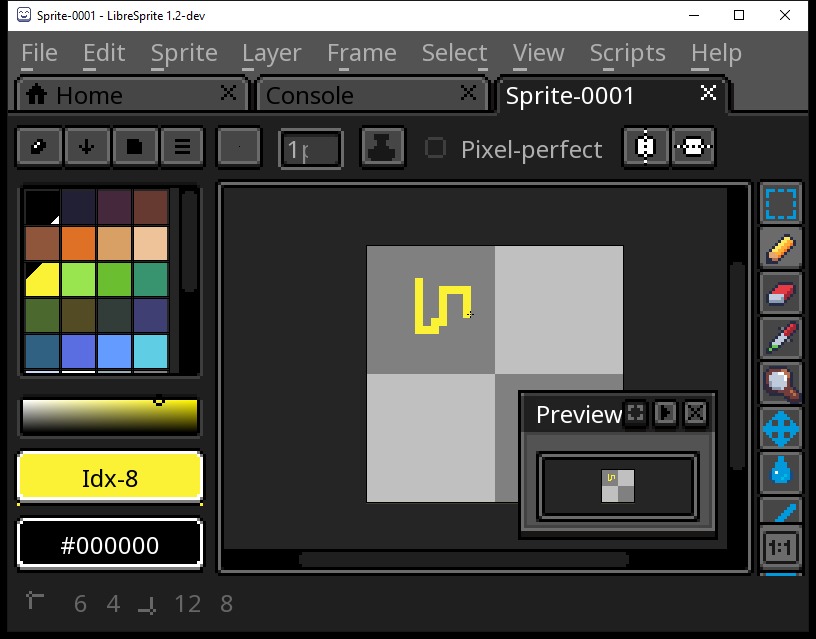
A while back I compiled Aseprite from source — a source-available, paid editor I built for myself with Visual Studio and a prebuilt Skia. This is the other half of that story. LibreSprite is the free, GPL fork of Aseprite, and I wanted to build it the way it’s meant to be built: with a fully open toolchain, no proprietary compiler, no pinned vendor binary. I cloned the repo, installed a pile of dependencies through a package manager, and ended up with a working libresprite.exe (LibreSprite 1.2-dev) that launches with the full GUI — drawing canvas, palette, animation preview, the lot. Claude was my pair programmer for it, and most of the work was figuring out that the project’s own official Windows instructions no longer point at anything that exists.
What it is
LibreSprite is a free and open-source pixel-art and sprite-animation editor: layers and frames, onion skinning, real-time animation preview, tiled drawing, palette management, the usual pixel-precise toolset. If that sounds exactly like Aseprite, that’s because it is one — or was. LibreSprite started as a fork of Aseprite back when Aseprite was distributed under the GNU General Public License v2. On August 26th, 2016, Aseprite moved to a proprietary license; LibreSprite forked from the last GPL commit and has been maintained as a free, GPL project by its community ever since.
That history is the whole reason this post exists as a companion to my Aseprite build, not a rerun of it. Aseprite today is source-available under its own EULA — you can compile it for yourself, but you can’t redistribute the binary, and the canonical build uses Visual Studio plus a prebuilt Skia. LibreSprite is genuinely free software under the GPL, and its build leans on an all-open toolchain: an open compiler (g++ via MSYS2), open dependencies installed from a package repository, and an open build system (CMake + Ninja). Same lineage, opposite license, opposite toolchain. Full credit for the editor goes to the LibreSprite project and its contributors — and, further back, to David Capello and the original Aseprite authors. My work here was purely getting it to compile on Windows.
How it was built
The supported Windows toolchain for LibreSprite is MSYS2 — the project ships with no Visual Studio solution you’d actually want to use today, and the real path runs through MinGW. The toolchain that worked for me:
- MSYS2 with the
ucrt64environment — using g++ 16.1.0. This is far newer than the codebase targets, but it built clean anyway. - Dependencies installed via pacman, all from the
mingw-w64-ucrt-x86_64-*set:cmake,ninja,pkgconf,curl,freetype,giflib,libjpeg-turbo,libpng,libwebp,pixman,SDL2,SDL2_image,tinyxml2,zlib, andlibarchive. - CMake + Ninja as the configure-and-build pair: from a ucrt64 shell,
cmake -G Ninja -DCMAKE_BUILD_TYPE=RelWithDebInfo ..followed byninja libresprite.
That build ran 1351 steps to completion with zero errors. The one thing that didn’t resolve was V8 — the project couldn’t find it, so the scripting engine fell back to the bundled duktape interpreter, which is a perfectly fine default and cost nothing. SDL2 and freetype do the windowing and font rendering, the image libraries handle the file formats, and the whole thing links against the MSYS2 runtime rather than the MSVC one.
The contrast with the Aseprite build is the point. There, the hard part was a proprietary-adjacent stack: a specific Visual Studio version and a prebuilt Skia binary pinned to an exact revision. Here, every piece is open and installable from a package repo. The pain moved somewhere else entirely.
The gotchas
INSTALL.md’s official Windows path is dead — mingw32/i686 no longer exists in modern MSYS2. This is the one to know before you start. LibreSprite’s INSTALL.md lists Windows 10 + VS2015 at the top, then gives the real instructions as a pacman command to run “in mingw32” using the 32-bit i686 dependency set (mingw-w64-i686-gcc, mingw-w64-i686-cmake, and so on). That environment was removed from MSYS2 in 2023. If you follow the documented steps on a current MSYS2 install, the i686 packages simply won’t resolve and there’s no mingw32 shell to run them in. The fix is to use the ucrt64 environment instead and substitute the ucrt-x86_64 package names for every i686 one in the list. That’s the entire difference between “the official instructions fail immediately” and “1351 steps, zero errors.” On this machine ucrt64 was the only environment with a working toolchain at all — the mingw64 directory existed but was empty — so ucrt64 wasn’t just the modern choice, it was the only one available.
The finished .exe needs C:\msys64\ucrt64\bin on PATH to run. Because LibreSprite is built against the MSYS2 runtime, the binary dynamically links a stack of DLLs that live in the ucrt64 bin directory — libstdc++, SDL2, freetype, and friends. Double-clicking libresprite.exe from a plain Windows shell that doesn’t have that directory on PATH gets you a missing-DLL error, not the editor. The fix is to make sure C:\msys64\ucrt64\bin is on PATH when you launch it (or to ship those DLLs alongside the exe for a standalone build). This is the open-toolchain tax: a Visual Studio build statically pulls in its runtime, but a MinGW build expects its runtime to be findable. Worth knowing before you conclude a successful build is “broken.”
A GUI-subsystem binary prints nothing to --version, which looks like a failure but isn’t. libresprite.exe is compiled as a Windows GUI-subsystem program, so it has no console attached. Run libresprite.exe --version from a terminal and you get… nothing — it prints no text and exits cleanly. The first time, that reads as a silent crash. It isn’t: the binary is fine, it just has no stdout to write to. The way to actually verify the build is to launch it and look at the window — which is exactly what the screenshot at the top of this post is: LibreSprite 1.2-dev running, with a sprite open on the canvas, the palette docked on the left, and the animation preview floating over it.
What shipped
A working build/bin/libresprite.exe (LibreSprite 1.2-dev), built entirely from source on Windows with a fully open toolchain: MSYS2 ucrt64, g++ 16, pacman-installed dependencies, and CMake driving Ninja. I verified it the only way a GUI binary lets you — by running it and confirming the editor comes up live, drawing canvas and palette and preview all working. The whole build is reproducible from a clean checkout once you know to reach for ucrt64 instead of the dead mingw32 path the project’s INSTALL.md still advertises.
To be clear about what this is: LibreSprite is someone else’s software — a free, GPL project built and maintained by its contributors. My contribution was narrow: getting it to compile on a modern Windows machine, and pinning down that the official instructions had quietly rotted. Set next to the Aseprite build, it’s a neat study in contrasts — same family of editor, but one is paid and source-available with a proprietary-flavored toolchain, and the other is free, GPL, and built with nothing but open parts.
It’s one of a series of projects I’ve been building this way; the running list is on the projects page.